By Gable · Updated · Competitor details checked · 7 minute read · Editorial standards
For readers in Canada: the prices and free trial on this page are for the US. Gable in Canada is on a waitlist for now. Join the Canada waitlist.
A seller report should include the week's online views and the total since listing, showings, the buyer feedback you choose to share, open house results, any offers, nearby homes that affect the seller's price, and a short note from you on what it means and what comes next. Keep it to what a seller can read in a few minutes, and send it on the same day every week.
Use this page as a checklist when you build your next report. Each section below says what to include, why the seller cares, and how to present it. For the bigger picture, see our seller reports guide. For an outline to copy and fill in, see our weekly seller report template.
The seller report checklist
- [ ] Listing photo, address and days on market
- [ ] Online views this week and since listing
- [ ] A simple views trend
- [ ] Showings this week and since listing
- [ ] Feedback you have chosen to share
- [ ] Open house results
- [ ] Offers, or a line saying none came in
- [ ] Nearby homes that matter to the price
- [ ] Your note: what happened, what it means, what is next
- [ ] How to reach you
To see every item filled in, read our sample seller report, section by section.
Why start with the listing basics?
A seller may forward the report to a spouse, a parent or a friend. Opening with the photo, address and days on market makes it clear whose home this is and how long it has been listed. Days on market also frames everything else. Two showings in week one reads very differently from two showings in week eight.
How should you show online views?
Online views answer the seller's first question: is anyone looking?
- Show this week and the total. The weekly number shows momentum, the total shows reach.
- Add a simple trend. A small chart of daily or weekly views tells the story faster than a number.
- Say where the numbers come from. Sellers trust a number more when they know its source.
- Do not oversell. Views show interest, not demand. A high view count with no showings is a signal worth explaining, not celebrating.
How should you report showings?
Showings are the strongest sign of real interest, so make them easy to find.
- Count this week and the total.
- List the dates, so sellers can match them to the times they left the house.
- Note second visits. A buyer coming back is the most hopeful thing in a report.
How much showing feedback should you include?
Feedback is the section sellers read most closely and the one most likely to upset them.
- Choose what to share. You do not need to pass on every comment word for word.
- Group similar comments. "Three buyers mentioned the kitchen" is clearer and kinder than three separate quotes.
- Keep buyers anonymous. Share what was said, not who said it.
- Add a plan. If buyers raise a concern, say what you will do about it.
Should you include open houses?
Yes, when you hold one. Include the date, how many groups came through, and anything notable, such as a buyer who asked for a private showing. If nobody came, say so and say why you think that was, such as the weather or a big event nearby.
How should you handle offers in the report?
If an offer came in, you have already called the seller, so the report is a written record. If no offers came in, say so plainly. A line such as "No offers this week. One buyer's agent asked about a flexible closing date" keeps the seller informed without bad news feeling like a surprise.
Should a seller report include nearby homes?
If you track them, yes. Sellers watch the homes around them closely and will ask about them anyway. A short list of nearby homes that came up for sale, went under contract or changed price helps them see their own listing in context. Keep it to the few homes that matter, and explain any that affect your recommendation.
What goes in the agent's note?
The note is the most important part of the report and the one only you can write. Keep it to three short parts:
- What happened. The week in one or two sentences.
- What it means. Your read on the numbers.
- What is next. Your recommendation and the next step.
Our weekly seller update template has example notes for a good week, a slow week and a week where you want to talk about price.
What should you leave out of a seller report?
- Private buyer details, such as names or financial situations.
- Raw, unedited feedback that could hurt without helping.
- Your internal notes and to-do list.
- Long explanations. If it needs a conversation, call.
- Numbers you cannot explain. If you are not sure what a number means, leave it out until you are.
How long should a seller report be?
Short enough to read in a few minutes on a phone. A clear set of headline numbers, a few lines of feedback and a short note is enough. A seller who reads a short report every week is better informed than one who skims a long one.
Where should the seller read the report?
Email gets it noticed. A portal keeps every week's report, every showing and the shared feedback in one place. The best pattern is both: a short email with the headline numbers and your note, linking to the full report in the seller's portal. Our client portal guide explains how portals work for sellers and buyers.
How Gable fills in the checklist
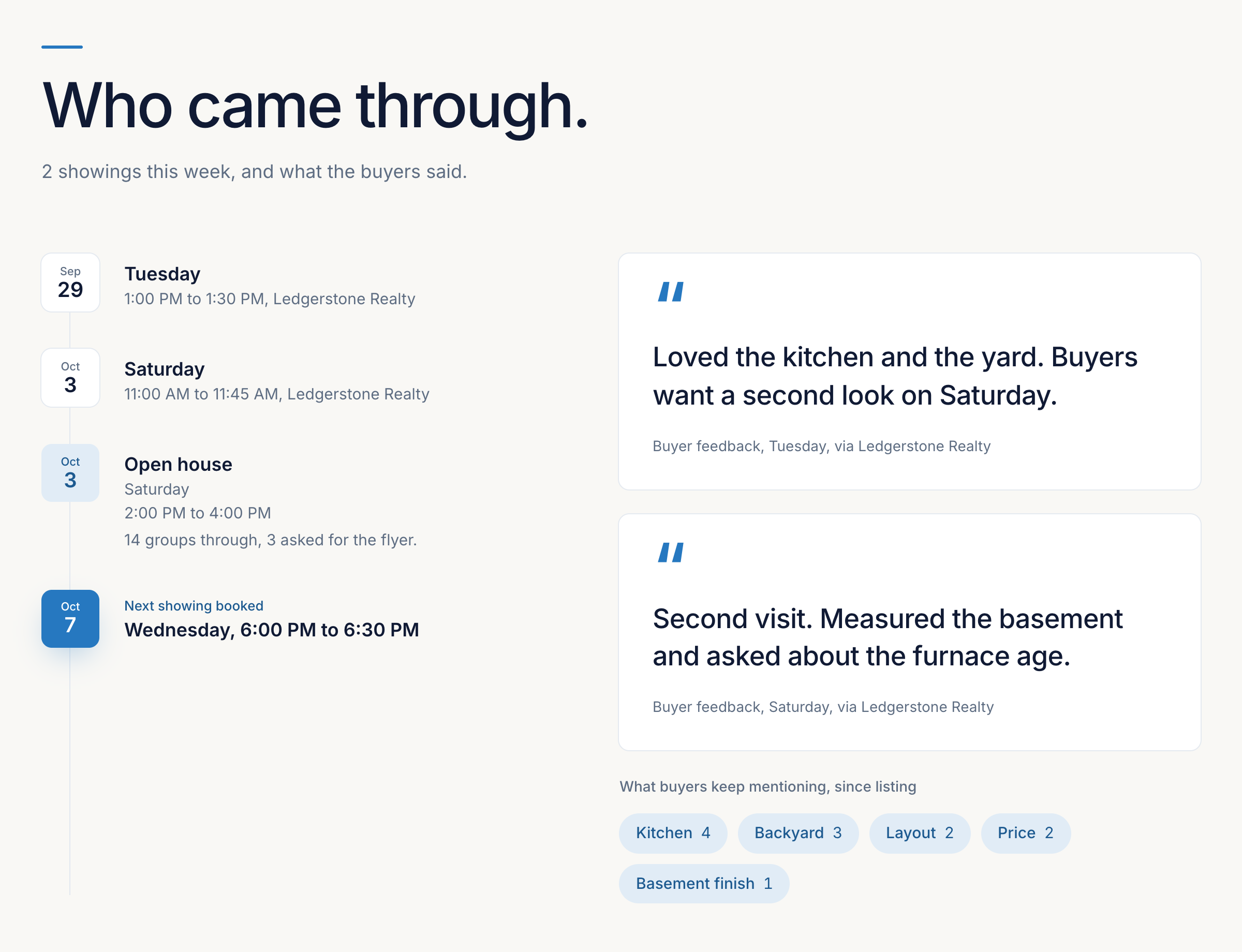
Gable is the product we build. In the US, you add a listing by pasting its Zillow or Redfin link. Views come from your ListTrac report, which you forward to your Gable address each week. BrokerBay showings come in automatically, and you type in their feedback. For US agents, ShowingTime showings and feedback come in automatically too. You can log any other showing and its feedback by hand in a few taps. You choose which feedback the seller sees, write your note, and the report lands in the seller's portal, which opens from one private link with no password. Your notes and private tasks never appear.
When an offer is accepted, your buyer gets their own portal from accepted offer to closing, showing where the deal stands, the key dates and deadlines, and who is on their team.
US plans are $99, $149, $179 and $199 USD a month for 5, 10, 20 or unlimited active transactions, with every core feature on every plan. In Canada, the same plans are $149, $199, $249 and $299 CAD a month. Social Studio is free for the first year when you join by Feb 1, 2027, then a paid add-on at $35 USD a month. See the Gable pricing page.
Frequently asked questions
What should a seller report include?
Online views this week and in total, showings, the feedback you choose to share, open house results, any offers, nearby homes that affect the price, and your note on what it means and what comes next.
How long should a seller report be?
Short enough to read in a few minutes on a phone. Headline numbers, a few lines of feedback and a short note from you are enough.
Should I include negative feedback in a seller report?
Include what helps the seller decide, grouped and anonymous, and pair any concern with a plan. You do not need to pass on every comment word for word.
What should I leave out of a seller report?
Private buyer details, raw feedback that hurts without helping, your internal notes and tasks, and any number you cannot explain.
Can a seller report be automated?
The gathering can be. For US agents, ShowingTime showings and feedback come in automatically, BrokerBay showings come in for you to add feedback, you forward your ListTrac report for views each week, and Gable builds the report. The note, where you explain what it means, is still yours to write.
Sources
Gable's own pricing page, checked November 5, 2026. This guide cites no competitor page.
- Gable pricing: getgable.ca/pricing?country=US
Related reading
- Seller Reports for Realtors: The Complete GuideWhat a seller report is, what goes in one, how often to send it, how to write the agent's note, and how to automate weekly seller reports for every listing.
- Weekly Seller Report Example, Section by SectionA complete sample seller report for one week of a listing, taken apart section by section, with a slow week and the first week under contract.
- Seller Update Email Templates (Copy and Use)Copy-ready seller update email templates for listing agents: a standard weekly update, a slow week, a strong week, a price conversation and an under contract update.